

Training courses and team events are crucial for professional and personal development. Team events can breathe new life into the professional context, as participants try out new things together, learn from each other and think creatively.
Our new blog series was created with this very idea in mind. During our last team event, our colleagues collaborated to develop a series of AI assistants. Each of these assistants supports typical everyday work tasks. In this series, we will introduce you to some of these assistants and explain how they work in objectiF RPM.
How SkillTrip Simplifies your Event Planning with AI
Today, kick things off with SkillTrip, an assistant that combines training with adventure and team building. SkillTrip is your smart companion for training trips and team events.
We have all been there. You have an idea for a team event, but turning it into a coherent concept with accommodations, a program, and evening activities often takes longer than expected. Researching and coordinating with colleagues takes up time that could be invested in designing the content.
To counteract this, one of our colleagues created this AI assistant. SkillTrip takes the first step for you. It collects suggestions and creates a structured agenda, providing you with the necessary overview. Based on this, your team can continue planning and making decisions in a targeted manner.
But what is actually behind it? How do you configure the AI assistant to fit your use case perfectly, such as planning training trips or team events?
1. You decide what data the AI can access as context.
This is very easy with objectiF RPM. You choose which project data is transferred. The schema is the decisive element here because it defines the information that your assistant can use to generate suggestions. For example, in the input schema “Journey with stops,” you specify the relevant properties for your training trip: description and name.
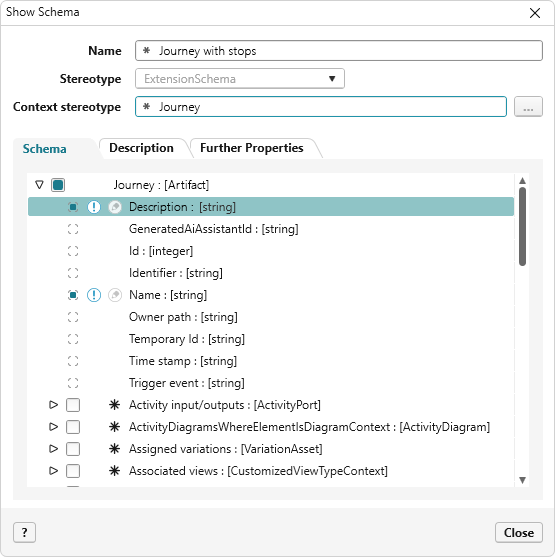
2. You determine which results you want to receive from the AI assistant and transfer to objectiF RPM.
This is what the “Stop” output schema is for. Here, you select the properties that the AI assistant should automatically fill in. In this case, those properties are the description, date, identifier, name, and time.
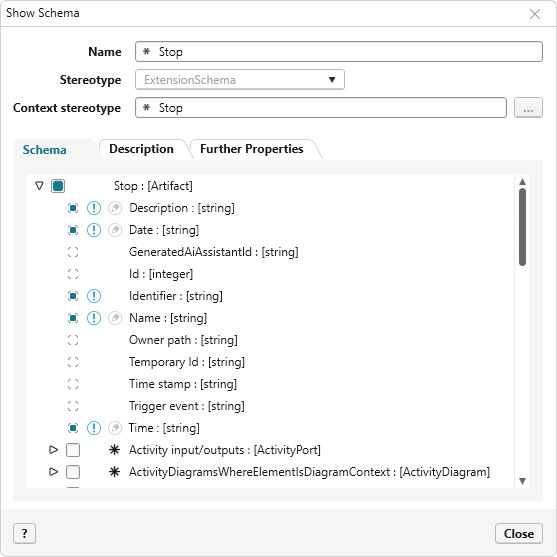
The assistant does not generate continuous text descriptions, but rather automatically fills in the corresponding data fields. To make this work, mark the exact fields in the output schema where the information should be sorted. This ensures structure and traceability.
3. You define the instructions for the AI assistant.
In our example, the AI assistant is responsible for planning a three-day training trip, including travel to and from the destination, as well as a detailed program that includes a closing dinner. The specifications are clearly formulated, and a time frame is established. Next, you provide the prompts that tell the AI what actions to perform.
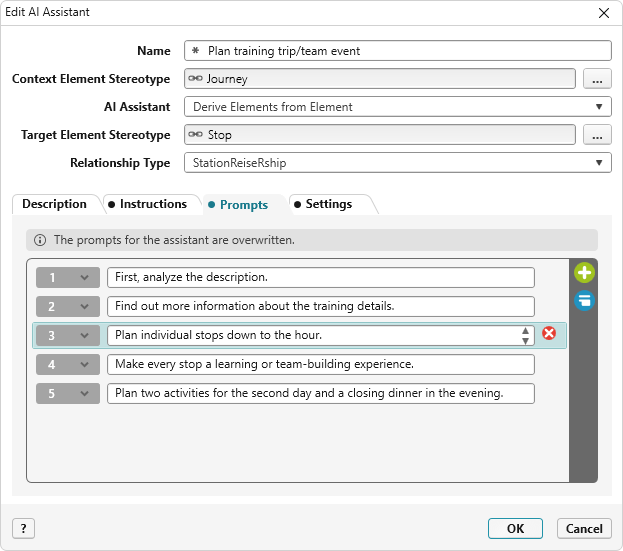
4. You create a suitable command.
For this AI assistant, use the project settings to specify which command can be used to access the assistant. In this example, the command is named “Plan training/event.”
Der The Travel Plan Is Ready – Thanks to your AI Assistant
SkillTrip has taken over the travel planning and turned it into a well-structured schedule. It organizes the days, suggests suitable activities, and ensures a clear focus on learning and teamwork. What began as an initial idea has evolved into a thoughtfully designed itinerary that seamlessly combines organization and inspiration.
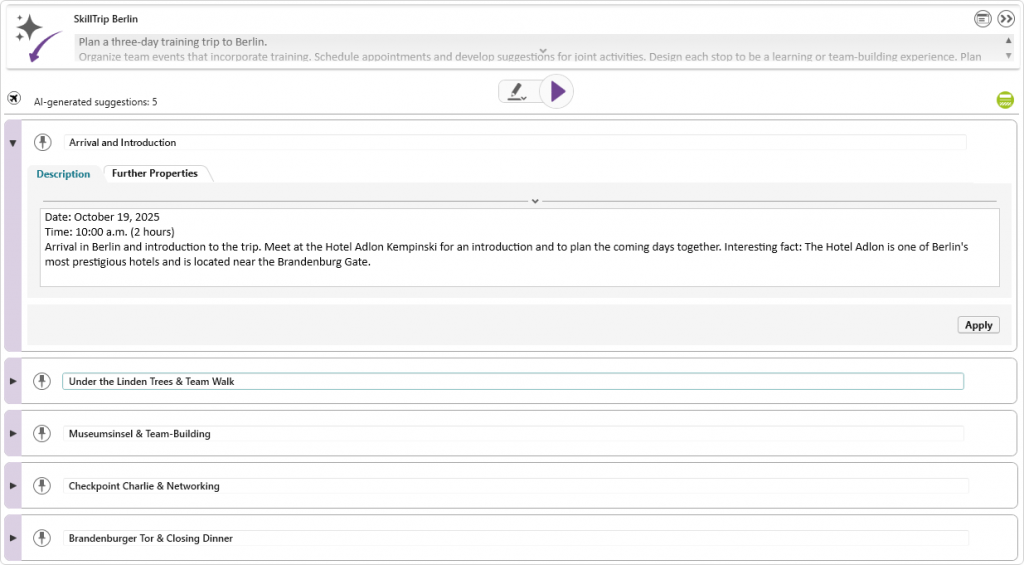
Suggestions accepted by the assistant are marked in turquoise and listed below the purple suggestions. If you don’t like an activity, simply replace it. The AI assistant will generate a new suggestion when prompted. To refine the results for a specific day, enter additional instructions and requests as a prompt, then run the assistant again.
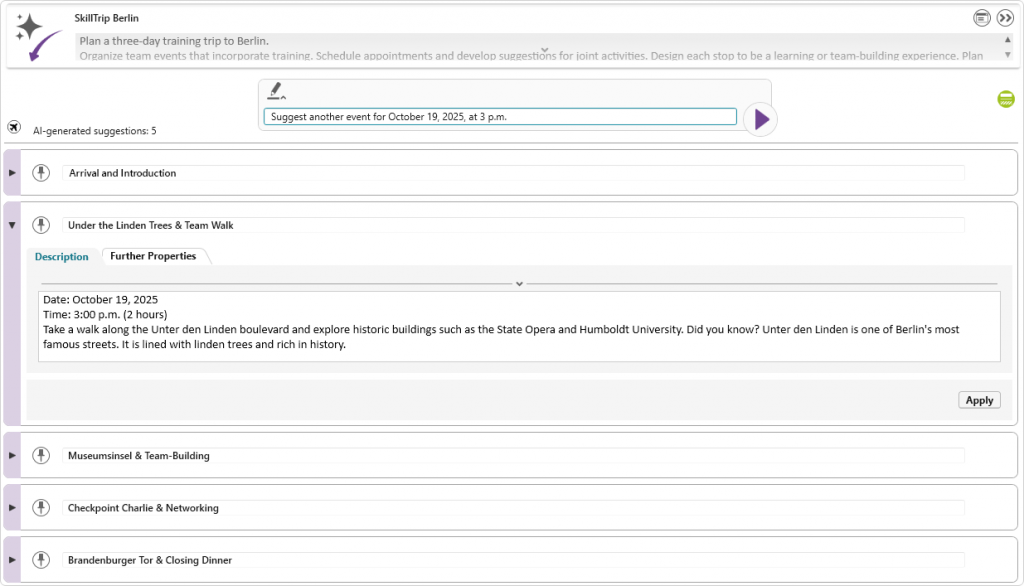
If you are satisfied with the new suggestion, add it to your selection. This will complete the AI assistant’s work, allowing you to seamlessly move on to the next planning step. With just a few clicks and some specific instructions, you will have gathered ideas and gained valuable time to focus on the next steps of your training trip.
Conclusion
SkillTrip clearly demonstrates the versatility of AI assistants in objectiF RPM. The assistant makes planning training trips and team events easier and represents the numerous possibilities of supporting your projects and processes with AI.
Whether you need help gathering ideas, structuring tasks, or supporting individual workflows, the AI assistants in objectiF RPM can be flexibly configured and adapted to a wide variety of scenarios.
One thing always remains the same: the AI takes care of time-consuming preparatory work, provides inspiration, and saves valuable time while keeping decisions and creative design in your hands. This inspires collaboration between humans and AI, making your projects more productive, effective, and intelligent.